
Finding
Finding things in the shopper's words
Forgiving search
Spelling slips and plurals are taken in their stride: "drils" finds drills and "boot" finds boots. Results keep up with your prices and stock.
Synonyms, suggested by AI
Tell search that "wellies" means wellington boots. AI proposes synonyms from the searches that found nothing, and you approve each one before it goes live.
Extra words for a product
Give a product search terms that never appear on the page, such as a trade name or an old part number. Shoppers find it; they never see the list.
Search by meaning
An option for shops whose customers describe what they want rather than name it: "footwear" finds safety boots even though neither word is in their names.
Autocomplete
Products, categories and pages appear as people type, so they reach the right page in a keystroke or two. Comes with Enterprise.
Articles as well as products
Guides, news and help pages can appear beside products, so a search for "care instructions" finds the answer.
Searching a category
Stay inside the aisle you're in
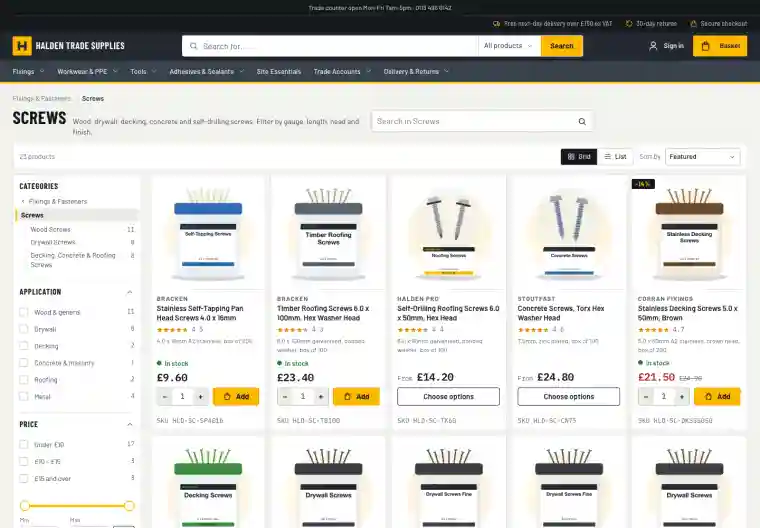
A shopper on the Screws page who searches for "stainless" wants stainless screws, not every stainless product in the shop.
A search box on category pages, scoped to that category
A choice in the header between the whole shop and the current category
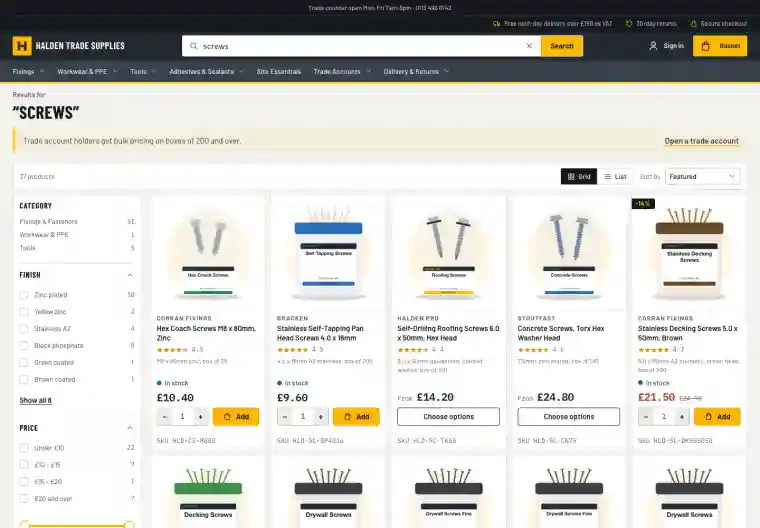
Results broken down by category, with counts, so a broad search narrows in one click
Every filter still works on the results
Search rules
Send a search where it should go
Some searches have one right answer. Others need a word of explanation. Rules let you handle both without touching a template.
Redirect a search: "returns" goes straight to your returns page
Show a message above the results: "Trade account holders get bulk pricing on boxes of 200 and over", with a link
Pin, boost or bury products for a search term (see merchandising)
Rules match the whole search, whatever the capitals or spacing
When it can't find something
Know why, and fix it in a minute
Every search that found nothing is listed, with what to do about it next to it.
Explain a search: whether a product is included, which words matched and which synonyms applied
Turn a failed search into a synonym or a product search term from the same screen
Searched often but rarely clicked: a list of searches whose results aren't working
Explore
More on search & merchandising
Filters
A filter rail chosen for each set of results, with colour swatches, ranges and counts that stay honest. Built for phones too.
Taxonomy & categories
Structured product data that drives filters, specifications and category pages, edited in the admin.
Brand & colour landing pages
A page for every brand or colour in a category, with its own heading and description, ready to be found in Google.
Merchandising & insight
Decide what comes first, steer searches, and see which searches turn into sales.